
Control Resonant Complete Controls for PC and Controller
Control's Controls.


Control Resonant is out now on PC and consoles, and like Remedy’s last few releases, it’s packed with settings to tweak and accessibility modifiers to use. It’s also fully playable with both keyboard and mouse and controllers, and here is the default control scheme for Control Resonant.
Control Resonant Complete Controls for Keyboard and Mouse
If you’re playing on a keyboard and mouse, here’s the full control scheme for Control Resonant.
| Action | Input |
|---|---|
| Move Forward | W |
| Move Backward | S |
| Move Left | A |
| Move Right | D |
| Jump / Elevate | Spacebar |
| Dodge / Rush | Shift |
| Reach / Execute | R |
| Enter The Gap | G |
| Interact | F |
| Shift | F |
| Radio Conversation | Alt |
| Camera Lock | Middle Mouse Button |
| Primary Attack | Left Mouse Button |
| Secondary Attack | Right Mouse Button |
| Combat Ability 1 | 1 |
| Combat Ability 2 | 2 |
| Combat Ability 3 | 3 |
| Combat Ability 4 | Q |
| Combat Ability 5 | 4 |
| Combat Ability 6 | E |
| Change Ability Set | Scroll Wheel Up |
| Command Ability | X |
| Play Audio Log / Close Tutorial | H |
| Open Menu | Tab |
| Open Map | M |
| Open Loadout | C |
| Open Inventory | I |
| Open Quest Log | J |
| Open Lore | L |
| Toggle Walk/ | / |
Control Resonant Complete Controls for Controller
Here are the complete controls for Control Resonant if you’re playing with an Xbox or PlayStation controller.
| Action | Xbox | PlayStation |
|---|---|---|
| Movement | Left Stick | Left Stick |
| Jump / Elevate | A | X |
| Dodge / Rush | B | Circle |
| Reach / Execute | LS (Press) | L3 |
| Enter The Gap | D-Pad Down | D-Pad Down |
| Interact | LB | L1 |
| Shift | LB | L1 |
| Radio Conversation | LB | L1 |
| Camera Lock | RS (Press) | R3 |
| Primary Attack | X | Square |
| Secondary Attack | Y | Triangle |
| Combat Ability 1 | LT | L2 |
| Combat Ability 2 | RB | R1 |
| Combat Ability 3 | RT | R2 |
| Change Ability Set | D-Pad Right | D-Pad Right |
| Command Ability | D-Pad Up | D-Pad Up |
| Play Audio Log / Close Tutorial | D-Pad Left | D-Pad Left |
| Open Menu | Menu | Options |
| Open Map | View | Touchpad |
| Toggle Walk | [unassigned] | [unassigned] |
Control Resonant Controller Support on PC
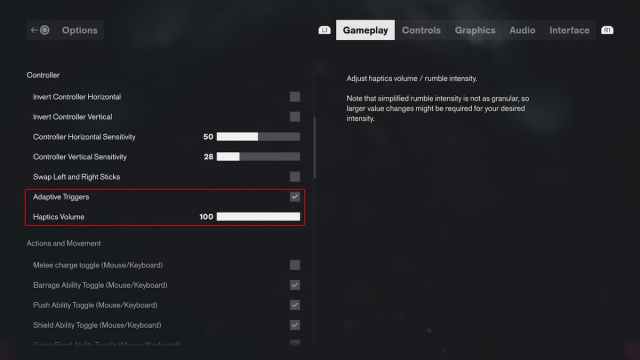
Control Resonant natively supports Xbox and PlayStation controllers, including the DualSense. It displays the correct button prompts for each controller type, and you can switch between them through the interface settings regardless of which controller is connected.
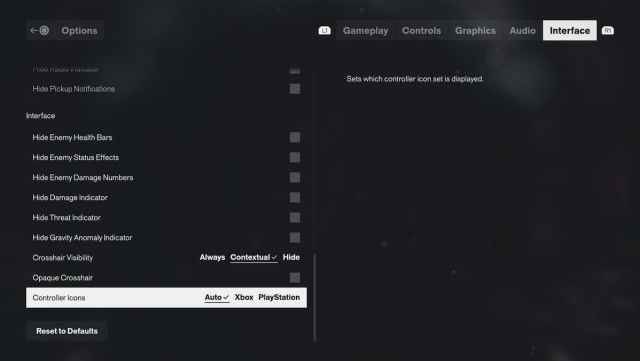
On PC, the game also supports haptic feedback, with an option to adjust its intensity. I did not have to disable Steam Input for the DualSense to work properly.
Can You Rebind Controls in Control Resonant?
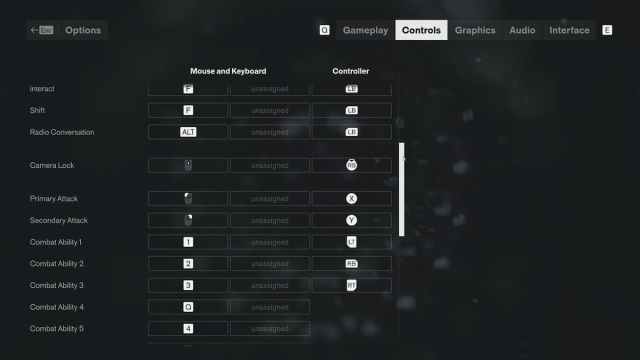
Yes, you can completely rebind controls in Control Resonant for both keyboard and mouse, as well as controllers. For keyboard and mouse, you can also assign alternate inputs for the same action.
Overall, regardless of what controller you’re using on PC, Control Resonant offers a smooth, customizable, and essentially plug-and-play experience.


