
Dark Souls III Starter Guide Gameplay
The HUD
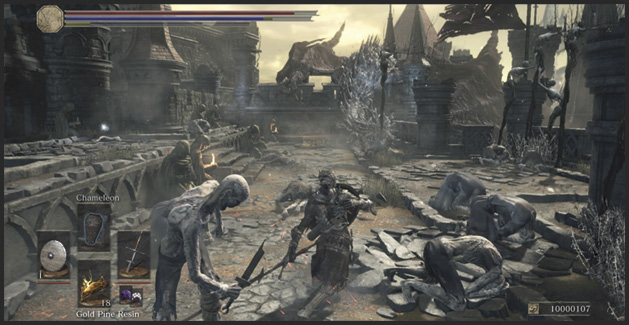
The HUD displays useful information at all times, so you never have to look far to check your status. Your character stays in the center of the screen and you have control of the camera to look around. Up top you have bars for your health (in red), your FPs (in blue), and your Stamina (in green). These fill or deplete depending on the actions you take, and that lets you track whether you can keep fighting, decide back off to rest, heal, or if it’s simply time to flee.
If your character’s health gets too low, you’re in great danger. Use the Estus Flask to heal, or retreat from combat entirely if that isn’t an option.
If your FPs bottom out, use the Ashen Estus Flask to restore them, or resort to basic attacks that don’t rely on them to get the job done.
Be careful about using the restoration from Flasks in combat, you are vulnerable while drinking. Try to disengage and take a drink away from hostiles and out of combat.
Stamina is the easiest to restore. Back off and lower your shield to restore your Stamina more quickly. It only takes a few seconds, and then you’re ready to re-engage.
In the bottom-right is your Souls counter, the currency of the world of Dark Souls. The higher the number, the more you have to spend. If you accumulate a large number of souls, you should take a break from exploring to invest them in character growth. If you don’t, you could lose them.
The bottom-left displays readied gear and spells. The items in your hands are on the left and right. The Tools you have readied are on the bottom. The top slot is for your spells.
Use the D-Pad to swap around these items with others in the same slots that you have prepared in the Equipment menu. Or, you can go into the Equipment Screen to swap these items around ahead of time.