
How To Skip Intro Videos in Doom The Dark Ages
Get to the ripping and tearing faster.


Doom: The Dark Ages is the latest entry in the modern Doom franchise, which serves as a prequel to Doom 2016. This is a showcase of id Tech 8, and id Software has done a tremendous job of producing high-quality visuals that look great across all platforms.
The PC version is arguably the most technically impressive, with support for even higher framerates and customization. However, like the last two entries, you’ll have to sit through the intro logos and videos on each launch. Here is how you can skip those in Doom: The Dark Ages.
Skip Intro Videos in Doom The Dark Ages
Like the previous modern Doom entries, to skip the intro videos in Doom: The Dark Ages, you need to use a launch command in Steam. This will take you directly to the main menu after a brief pause.
- Make sure Doom: The Dark Ages isn’t currently running.
- Open Steam and navigate to your library.
- Right-click on Doom: The Dark Ages and select properties.
- In the General tab, enter the following command at the bottom under “Launch Commands“
+com_skipIntroVideo 1
That’s all you need to do. Make sure the command doesn’t have any spaces in it, it has to be typed in exactly like the screenshot below.
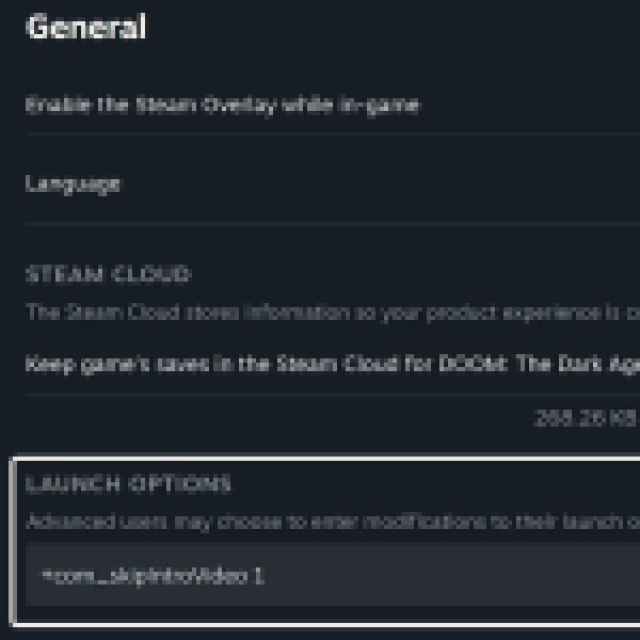

After that, you’ll skip the id Tech, id Software, and Bethesda logos and jump straight to the main menu of Doom: The Dark Ages. You’ll see a loading sign at the bottom right, but it’s much faster overall. The same command also works for Doom 2016 and Doom: Eternal. I’m not sure why publishers are obsessed with reminding us that they made the game; we already know.
If you want the videos to come back, for some reason, just remove the line from the line options. This is an official developer command, there is no technical issue with using it. A future patch might remove the line after verifying the game files, but I doubt that happens frequently enough.
Overall, Doom: The Dark Ages is essentially another revamp from id Software, this time focusing on parrying and tanky combat. It’s a vastly different game from Doom: Eternal, and takes the series in a new direction.


