
Ninja Gaiden 2 Black Complete Controls for PC and Controller
Perfection.


Ninja Gaiden 2 Black is a full remake of the classic 2008 title from Team Ninja that combines the best parts of the original title and its re-release Sigma 2. This is available for current-generation platforms as well as PC which is arguably the best version to play on. While it’s best played on the controller, Ninja Gaiden 2 Black fully supports the keyboard and mouse as well. If you need a reference for the default scheme, here are the complete Ninja Gaiden 2 Black controls for controllers, as well as keyboard and mouse for PC.
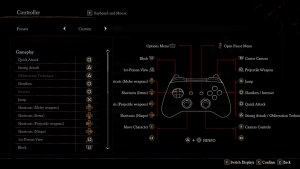
Ninja Gaiden 2 Black Complete Controls for Controllers
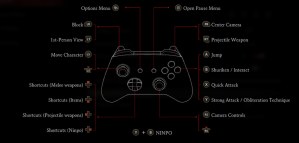
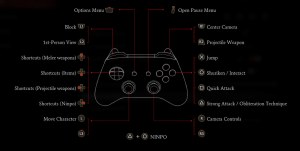
Here are the default controls for Ninja Gaiden 2 Black whether you’re playing on an Xbox or PlayStation controller.
| Action | Xbox | PlayStation |
|---|---|---|
| Jump | A | X |
| Shuriken / Interact | B | Circle |
| Quick Attack | X | Square |
| Strong Attack / Obliteration Technique | Y | Triangle |
| Center Camera | RB | R1 |
| Projectile Weapon | RT | R2 |
| Camera Controls | RS | R3 |
| Open Pause Menu | Menu Button | Menu Button |
| Options Menu | View Button | Touchpard |
| Block | LB | L1 |
| 1st-Person View | LT | L2 |
| Move Character | LS | L3 |
| Shortcuts – Projectile Weapons | D-pad Up | D-pad Up |
| Shortcuts – Items | D-pad Down | D-pad Down |
| Shortcuts – Projectile Weapons | D-pad Left | D-pad Left |
| Shortcuts – Ninpo | D-pad Right | D-pad Right |
| Ninpo | Y + B | Triangle + Circle |

Ninja Gaiden 2 Black Complete Controls for Keyboard and Mouse
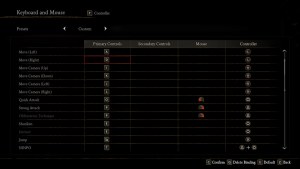
Here are the default controls for Ninja Gaiden 2 Black for keyboard and mouse.
Gameplay
| Action | Input |
|---|---|
| Move – Forward | W |
| Move – Back | S |
| Move – Left | A |
| Move – Right | D |
| Move Camera – Up | I |
| Move Camera – Down | K |
| Move Camera – Left | J |
| Move Camera – Right | L |
| Quick Attack | O or Left Mouse Button |
| Strong Attack | P or Right Mouse Button |
| Obliteration Technique | P or Right Mouse Button |
| Shuriken | E |
| Interact | E |
| Jump | Space bar |
| NINPO | T |
| Shortcuts – Melee Weapon | 1 |
| Shortcuts – Items | 2 |
| Shortcuts – Projectile Weapons | 3 |
| Shortcuts – Ninpo | 4 |
| 1st-Person View | Left Ctrl |
| Block | Left Shift |
| Projectile Weapon | R |
| Center Camera | Q |
| Open Pause Menu | Esc |
| Options Menu | Tab |
Menu
| Action | Input |
|---|---|
| Confirm | C |
| Back | Z |
| Details | Q |
| Techniques | E |
| Switch between Tabs (Left) | R |
| Switch between Tabs (Right) | T |
| Move Cursor Up | W |
| Move Cursor Up | S |
| Move Cursor Up | A |
| Move Cursor Up | D |
| Auxiliary function | Esc |
| Controls that vary by screen | F |
Ninja Gaiden 2 Black Complete Controller Support
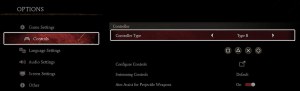
I’m happy to report that Ninja Gaiden 2 Black has native support for Xbox and PlayStation controllers on PC. I have personally tested the Xbox Series controller as well as a Dualshock 4 and both work perfectly. The game also has the correct in-game prompts for both controller types, and you can freely switch between either prompt style by selecting between “Type A” and “Type B”

Can you Remap Controls in Ninja Gaiden 2 Black?
Yes, players can remap controls for both the controller and keyboard and mouse by switching to the “custom” preset for either input type.
Fix Ninja Gaiden 2 Black Controller Issues on PC
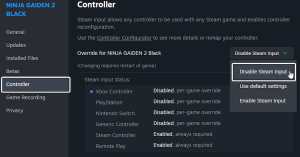
If you can’t get your controller to work properly with Ninja Gaiden 2 Black, you’ll need to disable Steam Input so the game correctly loads the profiles set up by the developers.
- Make sure Ninja Gaiden 2 Black isn’t running
- Open Steam and navigate to your library
- Here, right-click on Ninja Gaiden 2 Black and select Properties
- In the Controller tab, select the Disable Steam Input option under Override for Ninja Gaiden 2 Black
Overall, Ninja Gaiden 2 Black on PC is arguably the best way to experience the revival of a classic action title. It looks gorgeous thanks to a visual uplift that remains true to the original, and the return of gore and dismemberment absent from Sigma 2 makes it the best version to play for newcomers and fans of the original.


