
How to Respec in Crimson Desert – Respec Guide
Careful with those resets. They aren't free.


Most players get their skill tree wrong pretty early on in Crimson Desert. There’s nothing wrong with that, and it is common because during this phase, we’re all still learning the game.
Luckily, there’s a way to respec your skill tree in Crimson Desert, and here’s a quick guide showing you how.
How to Get Faded Abyss Artifacts and Reset Skills in Crimson Desert
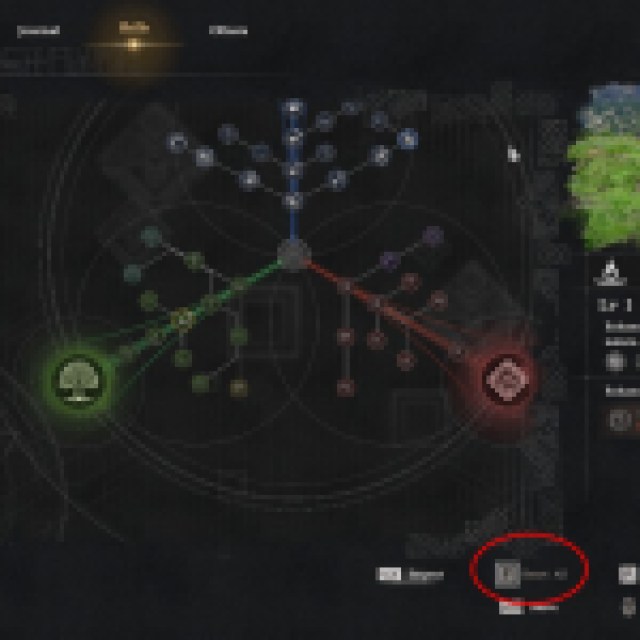
To reset your skill tree, open the in-game menu and go to the “Skills” tab. On the lower right corner of your screen, you’ll see a “Reset All” button. That’s how you’ll reset all your skills. It doesn’t matter which skill tree, weapon, or character you hover over; everything will reset during this step.
However, resetting skills isn’t free. Each reset consumes a Faded Abyss Artifact, and you get one early from doing the main quests. Afterward, it’ll take a while to get another Faded Abyss Artifact, so be careful what skills you spec into.
When you reach Chapter 4, you’ll eventually learn a recipe (from a research project) that allows you to craft Faded Abyss Artifacts using the Witch’s Cauldron. Faded Abyss Artifacts require one Abyss Cell and two Mercury to craft.
So far, crafting Faded Abyss Artifacts is the best way to reset your skills efficiently, but it’ll take a while before you reach Chapter 4. There are some Faded Abyss Artifact rewards beforehand, so there are plenty of opportunities to reset your skill tree.
If you aren’t sure which skills to use, I suggest saving the game manually before resetting your skills. Apply and test your planned skill build to see if it’s to your liking before committing completely.


