
How to Move Stuffed Animal Toy in The Sims 4 Forever Friends Event
Take your friend with you wherever you go.


The Forever Friends event in The Sims 4 is all about embracing the spirit of childhood and finding new ways for child Sims to play to complement the release of the Adventure Awaits expansion pack. A key task you need to finish in this event is moving a stuffed animal toy to a few different locations.
This task may sound easy enough, but getting the stuffed animal to the desired spots is a bit tricky, as very specific requirements must be met to progress. If any of the missions related to this item have you stumped, here’s how to move a stuffed animal toy in The Sims 4’s Forever Friends event.
Move Stuffed Animal in The Sims 4
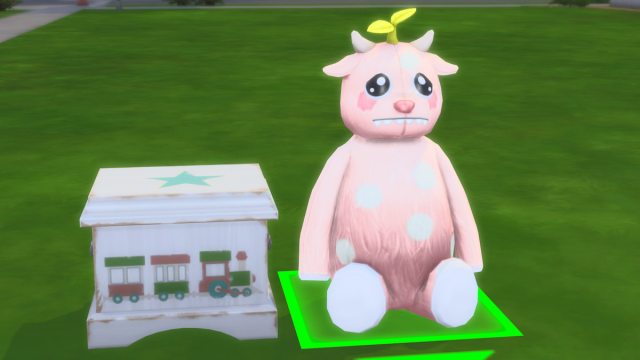
To move the stuffed animal around throughout the Forever Friends event, you need to click on it and drag it to the specified location. As of the Sept. 18 update for The Sims 4, all stuffed animals are now draggable items, making them a bit easier to move around. You can still pick them up in Build Mode, but it’s generally easier to just move them in Live Mode using this new method.
You need to move the toy around a few times throughout all week one quests, but this task is quite buggy and finicky, making it a fairly tricky one to get done. This is why it’s best to stick to dragging it around in Live Mode, as it’s much faster to try new spots using this method.
For all quests that ask you to place a stuffed animal toy in a certain spot, move this item within two tiles of the target item. There’s a bit of a delay in the interactions actually checking off after you move the stuffed animal toy, so let the game play for at least five seconds before you try to move it again.
Place a Stuffed Animal Near a TV in The Sims 4
To place a stuffed animal near a TV, purchase and place any TV from Buy Mode, then move the stuffed animal toy within two tiles of it. I used the Penguin TV for this one, as it’s a bit easier to make sure you get it close enough if you choose a TV that goes on the ground. Although the quest should get done as long as the toy is within two tiles, it’s fairly buggy, so I had to place the stuffed animal on the right side of the TV on the tile right next to it to complete this quest.
Place a Stuffed Animal Near a Toybox in The Sims 4

For the place a stuffed animal near a toybox task, follow the same rules, and place it within two tiles of any toyboy you like. You can use a base game one like Chomper the Devourer, or any toyboxes you may have from other packs, like Traveling Trunk. For this one, I had to drag the stuffed animal around to many different tiles near the toybox before the quest was complete. If you’re stuck, try all of the nearby tiles until one finally counts.
Place a Stuffed Animal Near a Bed in The Sims 4
The final mission related to moving the stuffed animal toy asks you to place it near a bed. This is the toughest one to complete, as there aren’t many open tiles near the bed. Do your best to place it as close to the bed as possible.
The only spot that counted for this quest was right next to the bed, blocking access to it, with the moveobjects cheat turned on. I tried to place it all around the bed without cheats, and none of the tiles worked until I put it right up against the bed. If you’re stuck on this quest, try placing it there.
If you’d like to see more helpful guides, news, or features from Prima Games, please consider adding us to your preferred sources.


