
How To Fix the Darktide Rainbow Shield Visual Bug on PC
That doesn't look right.


Warhammer 40K: Darktide is one of the most technically impressive titles on PC with excellent visuals across the board. It’s also a Fatshark title, which means that the launch had plenty of technical issues that were ironed out over the last few years. Some issues remain, however, and if you’re an AMD user, there’s a chance you’ll witness a visual bug while activating Psyker’s telekine shield that turns into a rainbow instead. Here is how you can fix this visual issue in Darktide, and enjoy Psyker’s shield in all its ethereal glory.
Fix the Darktide Rainbow Shield Visual Bug
The rainbow shield visual bug in Darktide is linked to the AMD Radeon Adrenalin software, and players need to disable the anti-lag feature.
- Open the AMD Radeon Adrenalin software
- Select the Gaming tab and under Graphics, toggle off Radeon™ Anti-Lag
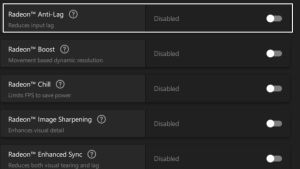
- This is also enabled by default if you’re on the HYPR-RX profile.
- If you use Anti-Lag on a global level, disable it for Darktide specifically, and the results will be the same.
Once you’re done with that, the rainbow effect on the Psyker’s telekine shield will be fixed and it should be the default blue color instead. This visual bug was documented by DashHandsome on the Fatshark forums, and their testing found the culprit and solution as well. The developers have acknowledged the problem in the same thread, but it seems that the issue is still prevalent in the game with more users reporting the same issue on Reddit and Steam.
Keep in mind, that this problem isn’t tied to performance and shows up even if you’re on a decent PC. We’re unsure if this issue is caused by the game specifically or the AMD drivers, but the current workaround does the job.
We hope that it’s addressed in a future update either for the game or the AMD driver so players who want to make use of Anti-Lag to reduce latency can have a better experience as well. While Darktide isn’t as competitive as Counter-Strike 2, improved latency is always useful, especially in a first-person title and if you’re using frame generation to improve performance.
Something that was added to Darktide is the ability to finally report players, so make sure you read up on how that works through the in-game options.


