
How Cross-Platform Mods and Mod.io Work in The Witcher 3 Remastered
Mods have never been easier to install and use


The Witcher 3 Remastered makes modding considerably easier by adding an official in-game mod browser powered by mod.io. Players on PC, PlayStation 5, Xbox Series X|S, and Nintendo Switch 2 can now browse and install supported mods directly through The Witcher 3.
How to Install Mods in The Witcher 3 Remastered
You can access the official Mod Manager directly from The Witcher 3 Remastered main menu.
To install a mod:
- Launch The Witcher 3 Remastered.
- Select Mods from the main menu.
- Sign in with your CD PROJEKT RED account.
- Connect your account to mod.io when prompted.
- Browse for a mod you want to install.
- Select Subscribe on the mod.
- Restart The Witcher 3.
- Return to Mods and open the Installed section.
- Make sure the mod appears there and that its checkbox is enabled.
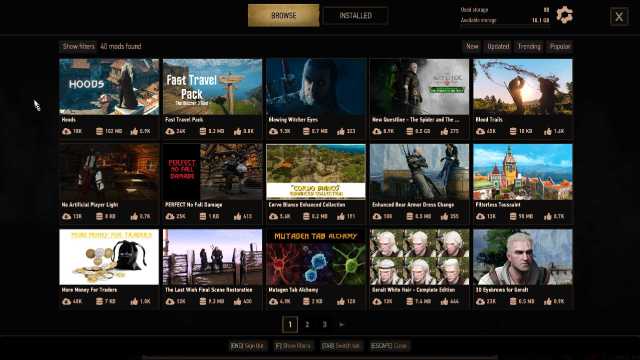
Once enabled, the mod should be active in your game. You will require a CD PROJEKT RED account connected to mod.io to install mods through the new system. If you do not already have a mod.io account, you can create one during the setup process.
Which Platforms Support Mods in The Witcher 3 Remastered?
The official in-game mod browser is available on:
- PC
- PlayStation 5
- Xbox Series X|S
- Nintendo Switch 2
You can enable mod.io mods on all versions of The Witcher 3 Remastered without any external tools.
Are All Witcher 3 Mods Available on Console?
No, although the new system creates a shared modding ecosystem, not every PC mod will necessarily be available on consoles. Mods must meet platform-specific content guidelines and be approved by mod.io before they can appear on console.
You can check a mod’s page for the ‘Available on consoles‘ tag if you are unsure whether it can be used outside PC. Alternatively, you can apply the “Available on consoles filter” to check all available console mods.
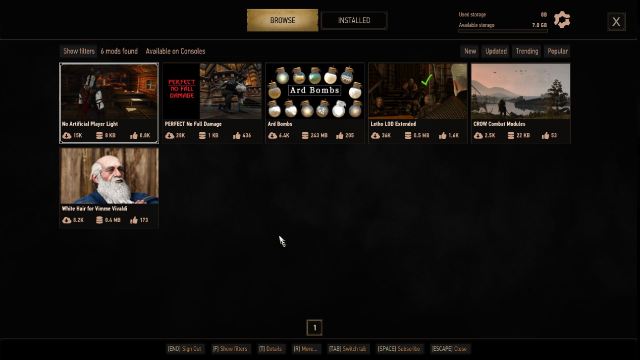
Script-based mods have an additional restriction, as console mods containing scripts must be created using The Witcher 3 REDkit. Texture, bundle, and similar mods can be created using other tools.
What Is The Witcher 3 REDkit?
The Witcher 3 REDkit is CD Projekt Red’s official PC modding tool. It gives creators access to tools based on those used by the developers themselves and can be used for developing different types of mods.
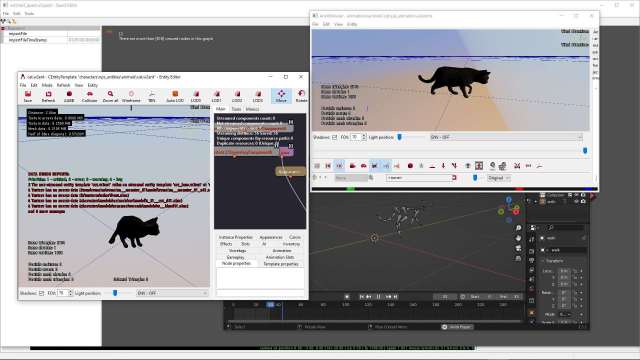
Creators can build or modify:
- Quests and storylines
- Characters
- Weapons and items
- Animations
- Environments and territories
- Gameplay systems
- Textures and other assets
You do not need REDkit to play mods, but it is an important part of the cross-platform ecosystem because console script mods must be created with it.
The Witcher 3 Remastered Mod.io vs NexusMods
Existing PC modding services such as Nexus Mods can still be used after the Remastered update. However, mod.io is the system used for official cross-platform mod support and is required for installing mods on consoles.

Mods from mod.io are available on both PC and console, but mods from Nexus Mods are only available for PC players. Mods distributed through the cross-platform system must meet platform-specific requirements and need to be approved by mod.io. Furthermore, console mods containing scripts must be created with REDkit.
Currently, Nexus Mods has a much larger variety of mods available for The Witcher 3 Remastered thanks to years of community work. If you plan on playing exclusively on PC, you can stick to Nexus Mods and learn basic modding.
However, if you plan on playing cross-platform, we suggest you stick to mod.io and its much more streamlined modding system. Mod.io provides the advantage of the mods available being vetted and officially approved while also ensuring a smooth transition for cross progression.
The Witcher 3 Remastered Mods and Cross Progression
Cross Progression still lets you move supported Witcher 3 save files between platforms by linking the game to the same CD PROJEKT RED account. Uploaded saves appear in the Load Game menu on other connected platforms. However, to use saves cross-platform, both devices need the same mods installed.
That means a modded PC save might not work if you transfer it to a console where one or more of its mods are unavailable. Not every PC mod for The Witcher 3 Remastered can be used on consoles because of technical limitations and mod.io support.
Before moving a modded save between platforms:
- Check which mods are enabled on the original platform.
- Confirm that those mods are available on the platform you are moving to.
- Install and enable the corresponding mods before loading the transferred save.
- Avoid relying on PC-only mods if you intend to regularly move that save between PC and console.
For example, a save using three mod.io mods that are available on both PC and PS5 is much easier to move between the systems than a save file that uses a Nexus Mods-only script mod.
The Witcher 3 Remastered Modding FAQs
The game identifies these saves with a small mod.io cog icon, making it easier to distinguish them from unmodded saves.
Yes, CD Projekt Red confirms that Achievements and Trophies are disabled for modded save files.
Yes, you can load a modded save offline if all required mods are already installed on your system.
No, mods still have to be created on PC using REDkit or another compatible modding tool.
Yes they are linked and synchronized via your CD Projekt Red account.
No, REDkit is a tool to create mods. You don’t need any additional software to enable mods.
While you’re here, check out all the changes in The Witcher 3 Remastered and the convenient new Accessibility presets.


