
How To Get the Quarantine Zone The Last Check Twitch Drops
Raccoon.


Quarantine Zone: The Last Check is out now in Early Access on Steam, letting you live out the fantasy of a checkpoint officer during a zombie apocalypse. To celebrate the launch, Devolver Digital has teamed up with Twitch for a Drops campaign featuring some fun goodies to grab.
Here is how you can get the Twitch drops for Quarantine Zone: The Last Check.
Get the Quarantine Zone: The Last Check Twitch Drops
Currently, the launch campaign for Quarantine Zone: The Last Check is live on Twitch and has the following rewards and requirements:
| Item | Item Image | Total watched minutes required / Requirement |
|---|---|---|
| Scanner Skin | 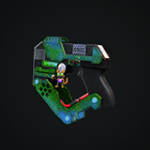 | 60 Minutes (1 Hour) |
| Thermopulseometer Skin | 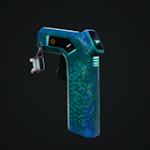 | 120 Minutes (2 Hours) |
| Reflex Hammer Skin | 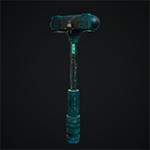 | 180 Minutes (3 Hours) |
| Soldier Skin | 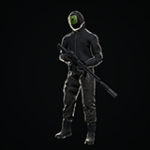 | 300 Minutes (5 Hours) |
| Raccoon Rat Skin | 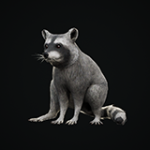 | Purchase 1 new recurring or gift subscription |
Quarantine Zone: The Last Check Twitch Drops Schedule
The current Quarantine Zone: The Last Check Twitch Drop campaign is available from January 9, 2026, to January 24, 2026.
There is still plenty of time to get these items. The only drop that requires spending some actual money is the Raccoon Rat Skin, since you need to purchase one new recurring or gift subscription; prime subs don’t count.
How to Claim Twitch Drops for Quarantine Zone: The Last Check
You need to connect your Twitch account with Quarantine Zone: The Last Check to become eligible for these rewards and the campaign itself.
- Head over to the following link and connect your Twitch account.
- Once you’ve linked your Twitch account, head over to any Quarantine Zone: The Last Check stream with drops enabled and watch the Stream (or put it on in the background) for the specified time, a total of 300 minutes if you want everything.
- You can keep track of the drop progress in your Twitch inventory. If the progress bar doesn’t update automatically, refresh the page.
- Once you have watched the specified time, you’ll see the “Claim Now” button on the same page, positioned over the item.
After you claim the items, these rewards will be delivered via email to the address associated with your Twitch account within 72 hours.


