
Clair Obscur: Expedition 33 Save File Location on PC
Who needs that many save slots?


Sandfall Interactive’s debut title, Clair Obscur: Expedition 33, is a critical hit and a massive success on Steam, surpassing 50,000 concurrent players within a day. The Unreal Engine 5 title is a visual feast and can be quite performant across various hardware.
You can also access your local progress for the game and individual save slot data by going to the Clair Obscur: Expedition 33 save file location on PC.
Clair Obscur: Expedition 33 Save File Location
| Client | Save File Location |
|---|---|
| Steam | C:\Users\[Windows Username]\AppData\Local\Sandfall\Saved\SaveGames |
Inside the SaveGames folder, there will be another folder with your unique numeric Steam ID. The save file for the first save slot is called EXPEDITION_0.sav, though there are a bunch of other files in the same folder with the .sav extension. This will likely go up to nine since there are multiple save slots.
Additionally, there are local backup saves inside the Backup folder as well. So even if, for some reason, your cloud saves are inaccessible, you can always restore your progress through the backup files.
I recommend copying the entire Sandfall folder for future use or backup purposes. Additionally, you can access the same location by entering the following address in Windows Run or File Explorer.
%LOCALAPPDATA%\Sandfall\Saved\SaveGames\
Does Clair Obscur: Expedition 33 Have Multiple Save Slots?
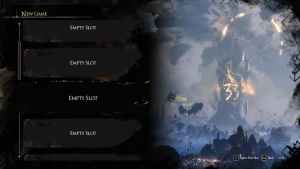
Yes, there are up to 10 save slots available in Clair Obscur: Expedition 33 for you to start a new campaign on. This is more than enough, and I doubt most people need more than a few, even for additional playthroughs.

Clair Obscur: Expedition 33 Steam Features
Clair Obscur: Expedition 33 comes with the following Steam features at launch:
- Steam Cloud: This allows players to access their data on different hardware devices.
- Family Share: Members of your Steam library have access to the game.
- Achievements: There are over 55 achievements to unlock in Clair Obscur: Expedition 33.
I recommend keeping Steam Cloud enabled for Clair Obscur: Expedition 33, as the files aren’t that large to begin with. Once you’re done backing up your saves, make sure to unlock the framerate cap during the cutscenes of Clair Obscur: Expedition 33 as well.


