
How to Use Planet Zoo 2 Photo Mode
All the details and tips on how to make the most of photo mode in Planet Zoo 2, a new feature for the sequel.


Planet Zoo 2 has plenty to sink your teeth into, and while zoo management is core to the game, the new Photo Mode adds a whole new level to in-game photography.
If you’re looking to find out where to access the Photo Mode, or want some tips to take the perfect snap, we’ve got you covered.
How to Use Planet Zoo 2 Photo Mode
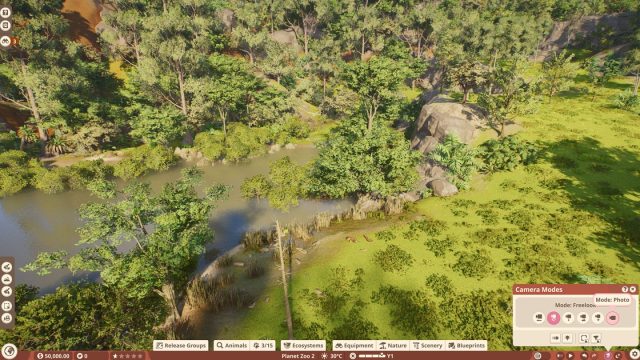
Photo Mode is a new camera option in Planet Zoo 2 which, as the name suggests, provides a dedicated tool for capturing the perfect photo.
This can be used either with the game paused or with time progressing, giving you greater options and customization to tweak the pictures you capture.
Additional settings are available to enhance your photos, including roll, zoom, focus distance, and filters.
Here’s a step-by-step process for accessing Photo Mode in Planet Zoo 2.
- Inside a zoo or wildlife reserve, find the bottom navigation bar.
- Select the camera option, located between the time of day settings and the undo/redo buttons.
- In the ‘Camera Modes’ pop up, select Mode: Photo.
- Snap away!
Planet Zoo 2 Photo Mode Tips
Here are some additional tips to help you get the best from Planet Zoo 2’s Photo Mode.
Find The Right Spot
Before you start messing with advanced options, establishing the perfect shot is crucial, and this involves finding the ideal location, alongside adjusting the pitch and roll to enhance the photos you take.
Much like an animal photographer in the real world, you may need to wait to capture the perfect shot, and patience is a virtue.
Focus On Interaction
While the animals in Planet Zoo 2 look good from every angle, one of the best ways to capture the perfect shot is to identify an interactable object and wait for the right moment to take a snap.
Animal enrichment items and climbing objects are a solid bet, but you can also get great pictures from more basic approaches, like waiting near water.
Use Filters
Your work doesn’t necessarily end when you’ve snapped a photo, as there is additional editing you can make to enhance the picture.
This includes adjusting the saturation, exposure and contrast, alongside the near and far focus distance, which can help to make the animal starring in the photo really pop.


