
How to Turn Simple Build Off in Fortnite
Let's get you back to basics.


Fortnite’s massive Chapter Seven, season one update brought loads of new content to the island. It also added some new gameplay features, including the Simple Build option, which you may be interested in turning off if it doesn’t fit your playstyle.
There are lots of different settings you can use to better customize your own unique gameplay style, so if Simple Build doesn’t feel right to you, it’s an easy fix once you know where to look. Here’s how to turn off Simple Build in Fortnite.
How to Turn Off Simple Build in Fortnite
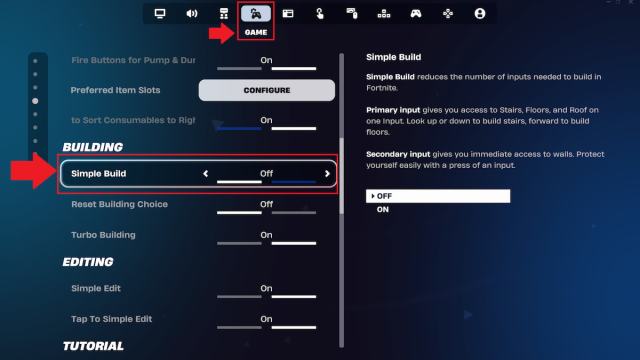
You can turn off Simple Build by toggling it off under the Game tab in Settings. There are quite a lot of tabs to navigate through on the Settings page, so finding the right spot to deactivate this option can be tricky. If you’re struggling to get it done, here’s a full step-by-step breakdown of how to complete this process.
- Open Settings.
- Switch over to the Game tab.
- Scroll down until you find Simple Build, which is under the Building category.
- Toggle Simple Building off.
- Select Apply near the bottom right corner.
You can change your Simple Build settings anytime you like by following these same steps again, so if you’re not sure whether or not you want to have it on, you can always test out playing with and without it to see which way you prefer.
There’s also a Simple Edit option not too far away from Simple Build, so make sure you double-check that you’ve selected the right one for the changes you wish to make. The changes also won’t go into effect until you select the Apply option to activate them, so make sure you don’t overlook this crucial last step.
What is Simple Build in Fortnite?
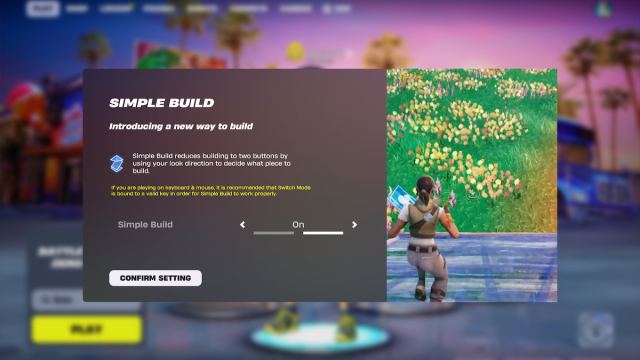
Simple Build basically, as the name implies, simplifies building overall, allowing you to build more quickly in the heat of battle. It does so by reducing the building mechanic to just two buttons, thus choosing what piece to place based on the direction you look.
Should You Turn Simple Build On Or Off in Fortnite?
Whether or not you should have Simple Build turned on ultimately comes down to your own unique playstyle. The right choice varies player by player, depending on how you fight and build in battle. And if you generally stick to Zero Build as I do, you don’t need to worry about this option at all, as building isn’t available in this mode.
If you already excel at building with the way it is without this option on, then you should stick with that, as you’re already a master at it. Classic building allows for total control and is generally the best option, as it comes with immense precision. It can be tricky to master, though, so there’s nothing wrong with sticking to Simple Build instead.
If you’re someone who struggles with building and fighting at the same time, you may want to consider turning Simple Build on, as it will make the process much easier for you. It’s also a great option if you’re new to building, as you could start with this to get used to juggling fighting and building, and consider eventually working your way up to full-on building.
There’s plenty more to learn about this season of Fortnite. Next, you may want to take a look at all Sidekicks, learn how to earn Sidekick Points, and check out all weapons and loot in Chapter Seven, season one.


