
How To Get the FBC Firebreak Twitch Drops
Chonk.


FBC: Firebreak launches tomorrow on PC and consoles. It’s a departure from Remedy’s usual narrative-driven single-player experiences and instead uses the Control universe as a backdrop for a cooperative shooter. To celebrate its launch, Remedy Entertainment has partnered up with Twitch for a drops campaign.
Here is how you can get the FBC: Firebreak Twitch drops and earn an exclusive armor set for your Firebreaker.
Get FBC Firebreak Drops
The Twitch drops campaign for FBC: Fireabreak has the following drops:
| Item | Item Image | Total watched minutes required |
|---|---|---|
| Overseer Gloves (Threshold Revision) | 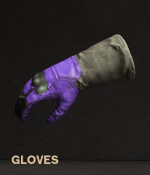 | 60 Minutes (1 Hour) |
| Overseer Helmet (Threshold Revision) | 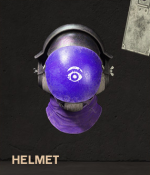 | 120 Minutes (2 Hours) |
| Overseer Body Armor (Threshold Revision) | 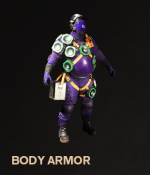 | 180 Minutes (3 Hours) |
The Overseer Armor Set (Threshold Revision) is exclusively available via Twitch Drops and will not be available outside of the campaign. It is purely cosmetic and doesn’t offer any gameplay benefits.
FBC Firebreak Twitch Drops Schedule
The FBC: Firebreak Twitch drops campaign will be available from June 17, 2025, till July 8, 2025. This gives players plenty of time to watch participating streams and get the drops.
How to Claim Twitch Drops for FBC Firebreak
You need to pair your FBC: Firebreak account with Twitch to get the drops.
- Launch FBC: Firebreak, and select Options.
- Here, in the Gameplay tab, scroll down to the bottom.
- Hover over Connect Twitch Account and either scan the QR code or click the “Open link in browser” button.
- This will take you to the following link, and step one will be completed. Next, sign in with Twitch by clicking on the button under Step 2, and finally link both accounts.
- Once you’ve linked your FBC: Firebreak and Twitch accounts, head over to any FBC: Firebreak stream with drops enabled and watch the Stream (or put it on in the background) for the specified time, a total of 180 minutes if you want everything.
- You can keep track of the drop progress in your Twitch inventory. If the progress bar doesn’t update automatically, refresh the page.
- Once you have watched the specified time, you’ll see the Claim Now button on the same page over the items one by one.
- After you claim the items, they will show up in your inventory.
I’m sure that Remedy will have more drops in the future, but for now, the adorable Overseer Armor Set isn’t something you want to miss out on.


