
Nioh 3 Camera Stutter Workaround on PC
Still better than UE5.


KOEI TECMO has released a meaty demo for Nioh 3, giving players a good chunk of the open world to explore, enemies to take on, and bosses to defeat. It’s a much better experience from a technical standpoint compared to Rise of the Ronin, but there are a few issues.
If you’re experiencing camera stuttering despite high FPS in Nioh 3, here is how to fix it for now.
Nioh 3 Camera Stutter Workaround
Like previous Katana Engine titles, Nioh 3 has an issue with its camera when panned, which can lead to uneven frame pacing and stutters even at high frame rates. It’s very hard to show this in the framepacing graph, but it’s very clear in motion. This happens even with VRR (such as G Sync or FreeSync) enabled, but based on some testing, there is a workaround that addresses the issue for now.
If you are consistently hitting 60 or 120 FPS, the camera stutter disappears entirely, resulting in a smooth presentation. Nioh 3 does not support an uncapped frame rate, so you will need to lock the game to either 60 or 120 FPS through the in-game settings. You can find this specific setting in the Visuals section.
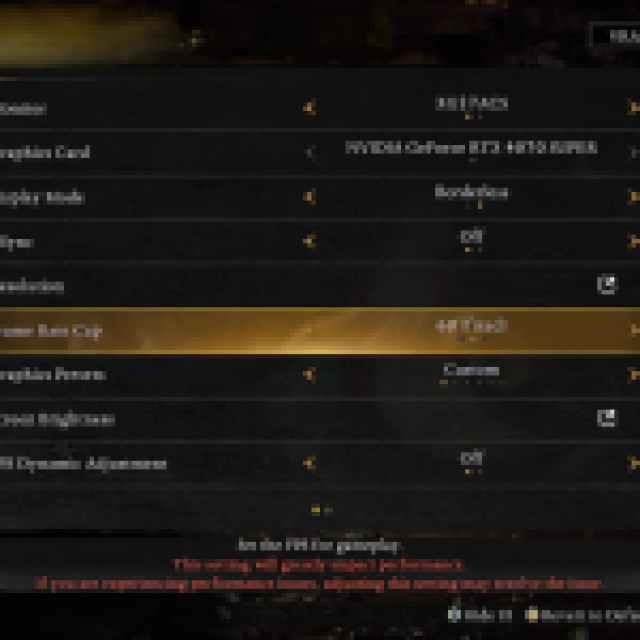

Even though I was able to reach 80 to 90 FPS on my setup, I have settled on a 60 FPS lock for now to eliminate the camera stutter and continue using DLAA for that higher image quality and fluidity. This 60 FPS lock feels much better than the stuttery motion I was getting at a much higher framerate.
You can also opt for the 120 FPS lock, but you need to ensure you can consistently hit that target, which may require lowering a few settings, using aggressive upscaling, or frame generation. Since the game is a bit heavy on the CPU side, I think a 60 FPS lock is much more reasonable and easier to maintain.
I hope Team Ninja is aware of this issue and plans to address it at launch, because outside of the camera stutter, Nioh 3 is a fairly performant title, supports modern upscaling technologies, and offers extensive customization for players to tailor their experience.


