
How To Move Buildings in The King is Watching
Put in a controls screen, please.


After a massively successful demo, The King is Watching has officially been released on Steam, and it’s already taken up hours of my time. It’s a fun roguelite kingdom builder with plenty of room for experimentation and strategy. That said, not everything is as immediately intuitive as you’d hope.
For one, there isn’t a controls menu in the settings, and despite a decent tutorial, the game doesn’t properly explain how to perform certain actions. Here’s how you can move around buildings in The King is Watching to improve your chances of surviving and managing resources efficiently.
Move Buildings in The King is Watching
To move buildings in The King is Watching, hold Shift and left-click on a building tile placed within the castle. This will let you move it around, and the cursor will change to a grab icon to indicate the action.


There are plenty of reasons to move building tiles around in this game, but it’s usually to pair certain buildings together at the right moment to maximize production based on how the King’s gaze works. If you don’t reposition them frequently, you risk having a difficult or inefficient run. This becomes even more important when all your tiles are occupied, and you’ll be demolishing and relocating buildings constantly.
The tutorial simply asks you to move around buildings, but doesn’t tell you how it’s done. It’s very weird because this was a common complaint during the demo as well, and I really think that the developers should consider adding a controls menu and explaining which button to press during the tutorial as well.
Demolish Buildings in The King is Watching
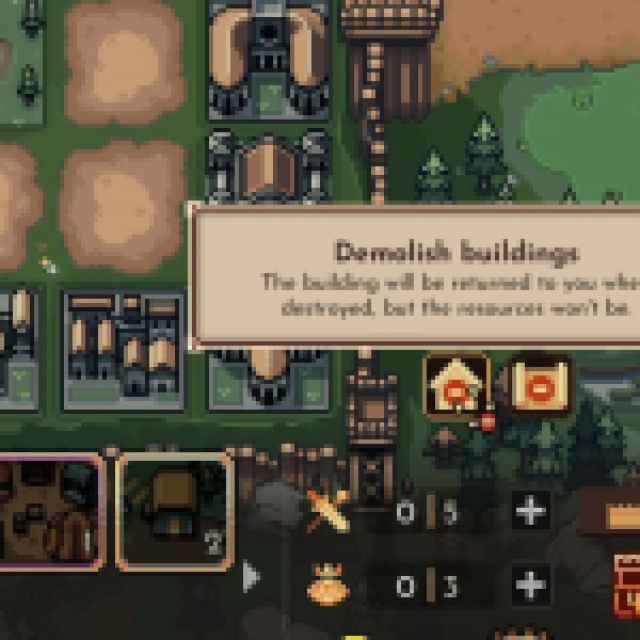
Similarly, once a building has served its purpose and can’t produce anything anymore, you need to demolish it to make room for new buildings. This is pretty simple, and all you have to do is click on the house icon with a stop sign, which will change your cursor accordingly, and then demolish the desired tile by selecting it within the castle.

The developers have already confirmed on Steam that they’re adding a save and quit option in an update, and I hope that giving players a bit more basic information about how their core features work is also on the way.


