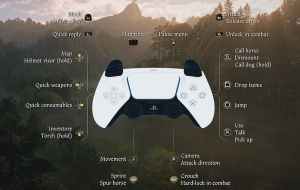
Kingdom Come: Deliverance 2 is a massive open-world RPG with tons of systems to manage. It’s an immersive experience that emphasizes historical accuracy to create a world that feels alive and lived-in. The PC version supports multiple input types and has full controller support as well. Whatever input type you end up using, if you need a reference for the default scheme, here are the complete Kingdom Come: Deliverance 2 controls for controllers, as well as keyboard and mouse for PC.
Recommended Videos
Kingdom Come: Deliverance 2 Complete Controls for Controllers
Here are the default controls for Kingdom Come: Deliverance 2 whether you’re playing on an Xbox or PlayStation controller.
Action
Xbox
PlayStation
Call Horse
Y
Triangle
Dismount
Y
Triangle
Call dog (hold)
Y
Triangle
Drop items
X
Square
Jump
B
Circle
Use
A
X
Talk
A
X
Pick up
A
X
Unlock in combat
RB
R1
Attack
RT
R2
Release arrow
RT
R2
Pause menu
Menu
Menu
Skip time
View Button
Touchpard
Camera
Right Stick
Right Stick
Attack Direction
Right Stick
Touchpad
Crouch
RS
Crouch
Map
D-Pad Up
D-Pad Up
Helmet visor (hold)
D-Pad Up
D-Pad Up
Quick weapons
D-Pad Left
D-Pad Left
Quick consumables
D-Pad Right
D-Pad Right
Inventory
D-Pad Down
D-Pad Down
Torch (hold)
D-Pad Down
D-Pad Down
Movement
Left Stick
Left Stick
Sprint
LS
L3
Quick Reply
LB
L1
Block
LT
L2
Draw arrow
LT
L2
Screenshot by Prima Games
Kingdom Come: Deliverance 2 Complete Controls for Keyboard and Mouse
Here are the default controls for Kingdom Come: Deliverance 2 if you’re playing on a keyboard and mouse.
General
Action
Input
Left
A
Right
D
Forward
W
Back
S
Accept / Use
E | Enter
Throw stone
G
Pat your dog or horse
V
Equip Torch
R
Lower helmet visor
Z
Skip dialogue
Space | Mouse Right
Abort / Exit
Esc | Backspace
Slow down your horse
Left Ctrl
Movement
Action
Input
Jump
Space
Sprint
Left Shift
Toggle crouch
C
Toggle walk
Caps Lock
Companion control
X
Rotate left
K
Rotate right
Toggle crouch
Combat
Action
Input
Primary attack
Mouse Left
Block
Mouse Right
Combat free look
Mouse 3
Lock on opponent
Tab
Special attack
F
Next opponent
Wheel Up
Previous opponent
Wheel Down
Abort attack
E
Quick Chat
Action
Input
Quick chat
Q
Quick chat with focus
Left Alt
Follow NPC or Focus Camera
Left Alt
Quick chat first option
1
Quick chat second option
2
Quick chat third option
3
Quick chat fourth option
4
Quick Items
Action
Input
Quick items
B
First weapon slot
1
Second weapon slot
2
Third weapon slot
3
Fourth weapon slot
4
First consumable slot
5
Second consumable slot
6
Third consumable slot
7
Fourth consumable slot
8
Inventory
Action
Input
Inventory
I
Player
P
Journal
J
Map
M
Codex
N
Crafting
C
Change clothing preset
O
Toggle info
Q
Cycle tabs
Tab
Centre map
F
Move item
X
Skip time / Help
T
Photo Mode
Action
Input
Photo Mode
F1
Photo mode slow movement
Caps Lock
Photo mode fast movement
Left Shift
Other
Action
Input
Secondary minigame action
F
Tertiary minigame action
Q
Reset alchemy bench
R
Move the cauldron
X
Can you Remap Controls in Kingdom Come: Deliverance 2?
The keyboard and mouse controls can be remapped in Kingdom Come: Deliverance 2. Players can’t rebind controller inputs or use a different preset. This might be different on consoles, but on PC, players are limited to editing just the keyboard and mouse bindings.
Kingdom Come: Deliverance 2 Supported Controllers on PC
Kingdom Come: Deliverance 2 has native support for Xbox controllers as well as the PlayStation DualShock 4 and DualSense. It also has correct in-game prompts for both controller types.
Screenshot by Prima Games
Screenshot by Prima Games
We’re very happy with the default control scheme on both input types. It’s also nice to see that the developers have set up native profiles for different controllers on the PC version. Once you’ve familiarized yourself with the controls, check out how the in-game photo mode feature works.
Ali Hashmi is a games journalist, reviewer, and guides writer with over eight years of experience covering the gaming industry across news, reviews, features, walkthroughs, and technical guides. He currently writes for Prima Games and GTA 6 Bible, and has previously contributed to Dot Esports, WhatIfGaming, GameTyrant, and The OuterHaven. With a background in Computer Science and years spent covering PC gaming, Ali has developed a strong focus on performance analysis, optimization, troubleshooting, and in-depth game coverage alongside traditional reviews and features.
A longtime fan of action games, Ali spends most of his time obsessing over stylish combat systems, difficult boss fights, immersive sims, and retro shooters that feel like they were pulled straight out of the late ‘90s. When he isn’t replaying Dark Souls for the hundredth time or climbing Ascension levels in Slay the Spire, he’s usually hunting for the next indie game to recommend to everyone around him. His coverage regularly includes AAA releases, indie games, Soulslikes, survival titles, live service games, and technical PC focused guides.