
How to Install Dark Souls 2 Seamless Co-op Mod
Dark Souls 2 like you've never experienced it before.


The Dark Souls 2 seamless co-op mod is finally here and if you plan on jumping back into Drangleic with a bunch of friends, you’re going to want to know how to set it up correctly. There are tons of customization and settings to keep in mind. Here’s how to install the Dark Souls 2 seamless co-op mod.
How to Install Dark Souls 2 Seamless Co-Op on Windows
You don’t need any other mods to run Seamless Co-Op. Download the mod files from its Nexus Mods page or GitHub mirror, then follow these steps:
- Extract the downloaded mod files.
- Open your Dark Souls II: Scholar of the First Sin installation folder.
The default location is usually:
C:\Program Files (x86)\Steam\steamapps\common\Dark Souls II Scholar of the First Sin\Game- Move the ds2sc_launcher.exe file and the SeamlessCoop folder into the Game folder.
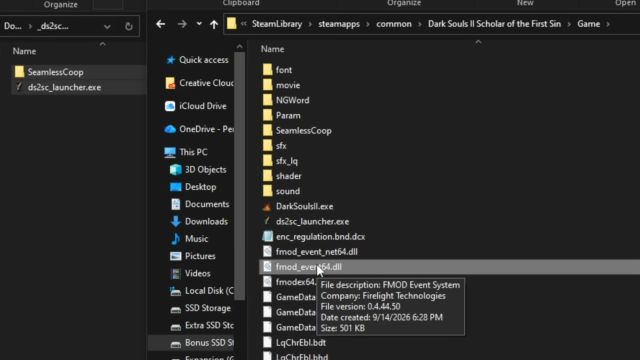
- Open the ds2sc_settings.ini file inside the SeamlessCoop folder.
- Set your preferred multiplayer password.
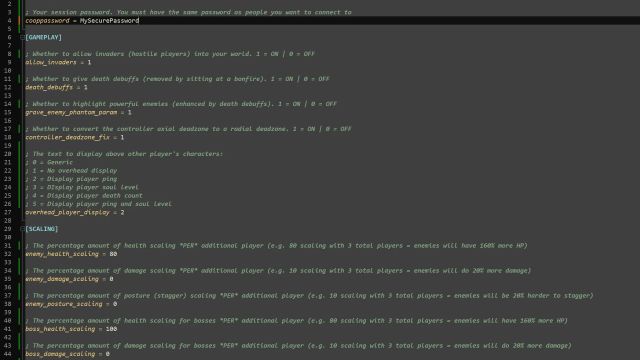
- Launch the game using ds2sc_launcher.exe.
The mod does not need to be permanently installed or active. You can launch the normal version of Dark Souls II through Steam whenever you want, and use the launcher only when playing Seamless Co-Op.
How to Play Seamless Co-Op in Dark Souls 2 SotFS
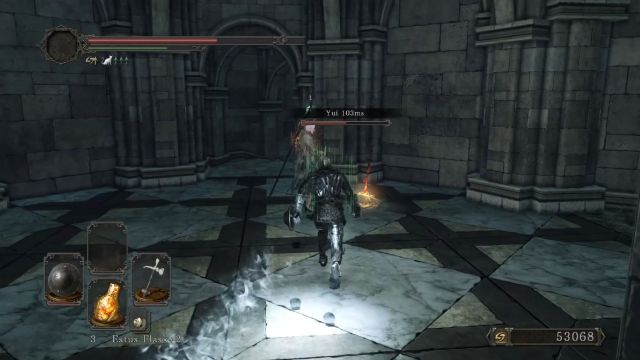
Once you load into the game and rest at a bonfire, you will receive the items needed for multiplayer. One player must host the session, while the others join. Everyone in the group needs:
- The same game version
- The same mod version
- The same password set in the configuration file
The mod uses Steam’s matchmaking system, so players need to be signed into Steam and cannot be playing offline.
- To host a session, use the Pharros’ Heliograph item.
- To join a session, use the Fragment of Brilliance.
- To leave a session, use the Obscuring Stone.
How to Install Seamless Co-Op on Linux and Steam Deck
Dark Souls II: Scholar of the First Sin’s Seamless Co-Op mod can also work on Linux and Steam Deck, but the setup requires a few extra steps.
First, follow the normal installation process. Extract the mod files, move the ds2sc_launcher.exe file and the SeamlessCoop folder into your Dark Souls II installation folder, then set your password inside the ds2sc_settings.ini file.
After that:
- Open Steam and select Add a Game in the bottom-left corner.
- Choose Add a Non-Steam Game.
- Browse to your Dark Souls II installation folder and select ds2sc_launcher.exe.
- Add it to your Steam library.
- Right-click the launcher in Steam and open Properties.
- Go to the Compatibility tab and select a Proton version newer than Proton 7.
- Launch the mod through Steam.
The mod creator also recommends setting launch options to keep Seamless Co-Op saves in the correct location:
STEAM_COMPAT_LIBRARY_PATHS=$HOME/.local/share/Steam/steamapps/ STEAM_COMPAT_DATA_PATH=$STEAM_COMPAT_LIBRARY_PATHS/compatdata/335300/ SteamAppId=335300 SteamGameId=335300 SteamOverlayGameId=335300 %command%You may need to adjust the Steam library path depending on where your game is installed.
Common Issues and Troubleshooting
The mod launches the vanilla game instead
Make sure you are launching ds2sc_launcher.exe and not the normal Dark Souls II executable. If you are having problems, try launching the vanilla game once before starting the mod.
Antivirus detects the mod as a threat
Some antivirus programs may flag Seamless Co-Op because of the way it hooks into the game. According to the mod page, these are false positive detections caused by how the mod interacts with the game files. If your antivirus quarantines any mod files, restore them and add an exception if needed.
“SeamlessCoop\locale not found” error
This usually means the locale folder was not copied correctly. You need to make sure the full SeamlessCoop folder, including its subfolders, is placed inside the Dark Souls II Game directory.
Steam timed out error
The mod cannot fix Steam connection problems, so if Steam is unavailable or undergoing maintenance, the mod may fail to connect.
Linux or Steam Deck crashes
Some Linux users have reported crashes depending on their Proton version and setup. If you continue having issues, check that:
- You launched vanilla Dark Souls II once before using the mod.
- The launcher is being started through Steam.
- Your Proton version is compatible with your setup.
Can You Get Banned?
No. The mod prevents players from connecting to FromSoftware’s official matchmaking servers and uses separate save files. Your Seamless Co-Op progress is stored separately from your normal Dark Souls II save. However, don’t move Seamless Co-Op save files back into the vanilla game, as this could potentially result in a ban.
For players who have always wanted to experience Dark Souls II with friends from start to finish, this mod is the closest thing to a full co-op campaign. If you still have questions or are facing unexpected errors, we suggest joining the official seamless co-op Discord server.


