
How to Hide Musashi’s Headgear in Onimusha: Way of the Sword
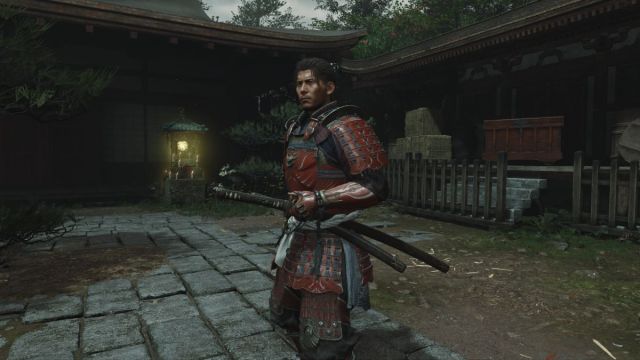
That's just Samanosuke.


Like previous games in the series, Onimusha: Way of the Sword has plenty of customization unlocks and outfits that let you personalize Musashi throughout the campaign. Full outfits, however, are fixed sets you can’t mix and match.
Thankfully, the game does let you hide Musashi’s headgear, although it isn’t immediately obvious how.
How to Hide Musashi’s Headgear
To hide Musashi’s headgear when it’s part of an outfit, press the Absorb Souls and Examine buttons simultaneously. You must press both buttons at the exact same time for this to work. This toggles the headgear on and off in real time.


Since the game supports multiple control layouts, here are the default inputs for both commands:
| Platform | Control Layout | Absorb Souls | Examine |
|---|---|---|---|
| PlayStation | Defensive | L2 | X |
| PlayStation | Aggressive | L2 | L1 |
| Xbox | Defensive | LT | A |
| Xbox | Aggressive | LT | LB |
| PC | Default | C | F |
| Nintendo Switch 2 | Defensive | ZL | B |
| Nintendo Switch 2 | Aggressive | ZL | L |
If it doesn’t work, make sure you press both buttons simultaneously rather than one after another, and don’t hold either button down. Both inputs need to be quick presses for the command to work.
This works with all outfits that include headgear, making it a handy option if you don’t like a particular piece or prefer Musashi’s look without it. Personally, I think Musashi looks much better with the headgear disabled when you have the Red Armor from the Deluxe Edition equipped. It also gives him a look that’s very reminiscent of Samanosuke in the original game.
This feature could also be a potential callback to the original Onimusha, where you can toggle the hood of the Panda outfit by pressing L2 on the PlayStation 2 controller.
Whether this is a glitch or an intended developer feature is unknown at the moment, as there are no in-game tutorials or mentions in the official manual, and the trick was discovered by the Onimusha community. Either way, it’s a useful feature that works even during cutscenes and dialogue encounters. If it’s intentional, then it’s definitely a secret command, and I really hope that’s the case. If it’s a glitch, I hope CAPCOM doesn’t remove it in a future update.


