
Aniimo Evolution Guide: How to Evolve Aniimo
Everything you need to know on how to evolve Aniimo, including various types of Evolution requirements and how to check what's needed.


Aniimo has a wide array of creatures to encounter, many of which have evolutions in their species to unlock stronger and varying forms, but the process can be complicated initially.
Evolution has always been a core part of creature-capture titles and remains the case in Aniimo, although there’s no automatic evolution process, which results in fiddly navigation through the menus.
If you’re confused about how to evolve Aniimo, fear not, as we’ve got all the details and an explanation of the requirements.
How to Evolve Aniimo
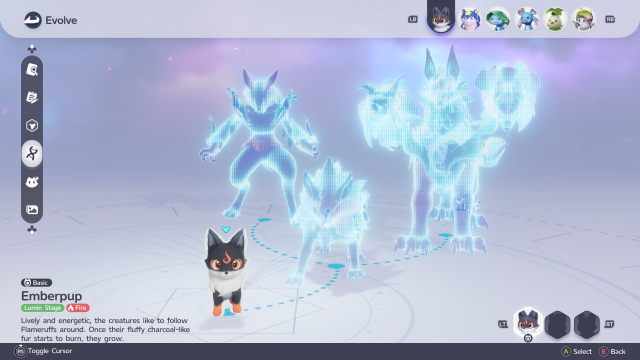
Evolution in Aniimo is done through an in-game menu and does not trigger automatically, like other creature-capture titles, though there is a quick-evolve option that appears via a pop-up.
Without the popup, the Aniimo evolution screen is shown via the Aniimo Management page on the main menu, which also outlines the full evolution line and requirements that must be met before evolution can be triggered.
Given the UI, it’s not immediately obvious where this option is found; however, here’s a step-by-step guide to evolve.
- Open the main menu.
- Select Aniimo Management
- Select the Aniimo you wish to evolve
- Find and select the Evolve icon, which features a cat-shaped symbol and upward-facing arrows.
- On the following page, press the Evolve button to confirm the process.
Aniimo Evolution Requirements
Aniimo has a wide array of evolution requirements in the game, ranging from the basic, like reaching a certain level, through to completing specific side objectives and missions.
Early on in the game, you’re introduced to these mechanics with Emberpup, which requires you to complete a Sanctum before it can evolve, and you’ll also have to reach the required level.
Other Aniimo, meanwhile, have much more basic evolution requirements that follow many other creature-capture titles, with only a specific level being required.
However, the process is not automatic and must be completed via an in-game menu, though there is a quick-evolve pop-up that appears when requirements are met.


