
Capcom Releases Onimusha: Way of the Sword Benchmark Tool Ahead of Launch
Time for some testing!


Onimusha: Way of the Sword has a new release date, and it’s coming out sooner than expected. CAPCOM released a demo for the game across all platforms in June, showcasing an early section of the upcoming title.
Now, CAPCOM has also released a free benchmark tool for the PC version of Onimusha: Way of the Sword, letting players see what kind of performance they can expect across a variety of scenarios.
Onimusha: Way of the Sword Benchmark Tool
You can now download the Onimusha: Way of the Sword benchmark tool on Steam and the Epic Games Store to see how well your PC is likely to perform in the full release. It runs through a variety of scenarios, including cutscenes, combat encounters, a boss fight, and traversal.
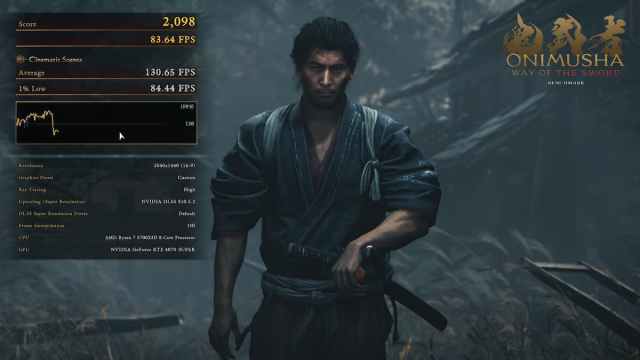
The benchmark tool lets you adjust graphics settings and enable DLSS. During the run, it displays a framerate graph, average FPS, 1% lows, and your current settings in real time. Once the benchmark is complete, you’ll see a results screen showing your overall score, rating, average FPS, and 1% lows during both cinematics and combat.
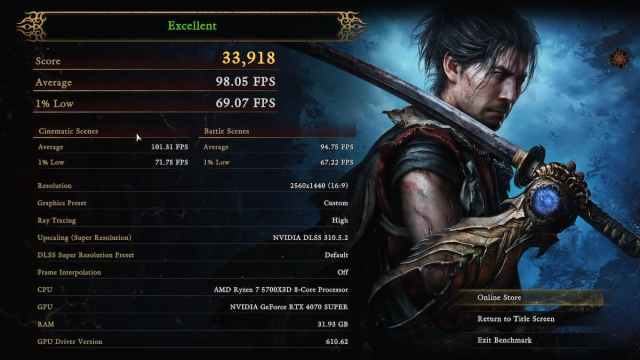
Here’s a breakdown of what each score means:
| Score Rating | Benchmark Score |
|---|---|
| Excellent | 25000+ |
| Good | 20000 – 24999 |
| Playable | 11000 – 19999 |
| Setting changes recommended | 7000 – 10999 |
| Setting changes required | 5000 – 6999 |
| Insufficient performance | 0 – 4999 |
Download the Benchmark Tool
The benchmark tool is around 15 GB on PC, and you can download it from the links below:
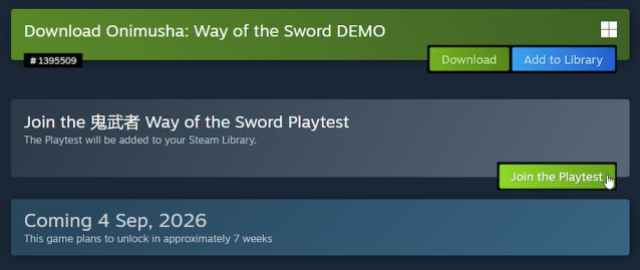
On Steam, it’s listed as a playtest on the store page under the title “Play the 鬼武者 Way of the Sword Playtest now!” which will then be added to your library, while on the Epic Games Store it’s listed as a demo under the title “Onimusha: Way of the Sword Benchmark.”
Onimusha Way of the Sword System Requirements
| Minimum | Recommended | High | Ultra | |
|---|---|---|---|---|
| Resolution | 1080p (with upscaling) | 1080p (with upscaling) | 1440p (with upscaling) | 2160p (with upscaling) |
| Frame Rate | 30 fps | 60 fps | 60 fps | 60 fps |
| Preset | Low | Medium | High | Ultra |
| OS | Windows 11 | Windows 11 | Windows 11 | Windows 11 |
| Processor | Intel Core i5-8400 AMD Ryzen 3 3100 | Intel Core i5-10400 AMD Ryzen 5 3600 | Intel Core i5-10400 AMD Ryzen 5 3600 | Intel Core i5-12400 AMD Ryzen 7 5700 |
| Memory | 16 GB | 16 GB | 16 GB | 16 GB |
| GPUb | GeForce GTX 1660 (6 GB) Radeon RX 5500 XT (8 GB) | GeForce RTX 2060 Super (8 GB) Radeon RX 6600 (8 GB) | GeForce RTX 4060 Ti (16 GB) Radeon RX 6750 XT (12 GB) | GeForce RTX 4070 Ti (12 GB) Radeon RX 7900 XT (20 GB) |
| VRAM | 6 GB | 8 GB | 12 GB | 12 GB |
| DirectX | Version 12 | Version 12 | Version 12 | Version 12 |
| Storage | 50 GB SSD | 50 GB SSD | 50 GB SSD | 50 GB SSD |
In addition to the benchmark tool, you can download the demo and play through an early section of the game. It’s a bit on the easy side, but it offers a solid preview of what to expect from Musashi and the full release.


