
How To Get the ARC Raiders Twitch Drops
MORE!


ARC Raiders remains a phenomenon in 2026, with a very loyal fanbase thanks to the excellent support from Embark Studios. Whether it is in the form of content drops, Twitch campaigns, or regular updates, it is a great time to play the extraction title.
Here is how to receive the latest ARC Raiders Twitch drop on your preferred platform.
Get ARC Raiders Twitch Drops
Currently, the Riven Tides campaign is active for Arc Raiders with the following drops:
| Item | Item Image | Total watched minutes required |
|---|---|---|
| Floppy Disk Backpack Charm | 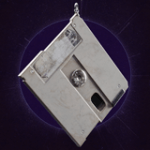 | 60 Minutes (1 Hour) |
| Buoy Backpack Charm |  | 120 Minutes (2 Hours) |
Both are cosmetic items you can attach to your backpack. I really like how the Record Player looks, in particular.
ARC Raiders Twitch Drops Schedule
| Drops Campaign | Schedule |
|---|---|
| Arc Raiders Riven Tides Campaign | April 28, 2026 to May 26, 2026 |
As of writing, that gives you 14 more days to put two hours of streams on. You don’t have to subscribe to any streamer to get any rewards, as both drops are tied to watched minutes only.
How to Claim Twitch Drops for ARC Raiders
To claim Twitch drops, you need to connect your unique Embark ID with your Twitch account and watch participating streams for the specified time.
- Head over to the following link and sign in using your platform’s account (Steam/PSN, etc).
- Next, open the Connected Platforms tab on the Embark website and click on the LINK button next to the Twitch icon.
- Once you’ve linked the Embark ID Twitch, head over to any ARC Raiders stream with drops enabled and watch the stream (or put it on in the background) for the specified time. 120 minutes in this case, which isn’t much.
- You can keep track of each drop’s progress in your Twitch inventory.
- Once you have watched the specified time, you’ll see the “Claim Now” button on the same inventory page, located over the items.
- After that, log in to ARC Raiders again, and you’ll see the items in your inventory.
- You won’t have to wait for these to show up; it’s usually instant, though you might have to log in again if you’re already in an active session.
As always, the items featured in the new campaign are fun little additions that add a bit of extra flair to your Raider’s backpack, and the requirements to claim them aren’t that tedious either. Embark Studios has been pretty consistent with their Twitch drops, and I hope that continues to be a trend.


