
How to fix The Hundred Line Last Defense Academy Ultrawide Issues
Lyall to the rescue!


Too Kyo Games have started 2025 with a brand new title, The Hundred Line: Last Defense Academy, a tactical RPG led by Kazutaka Kodaka. It’s currently available on PC and Nintendo Switch, and the PC port is solid with a decent selection of settings to tweak.
It’s not perfect, however, and lacks any form of ultrawide or HDR support. As usual, we can count on Lyall from the modding community to address this lack of ultrawide support with a handy patch.
Fix The Hundred Line Last Defense Academy Ultrawide Issues
By default, The Hundred Line: Last Defense Academy does not have any ultrawide support, and you will see black bars at the sides during gameplay and cutscenes. Lyall’s patch addresses this, removing pillarboxing and letterboxing from the presentation for a proper ultrawide experience.
As usual, the patch installation is fairly straightforward:
- Head over to the following GitHub link.
- Download the latest release by clicking the zip link under Assets.
- Extract the zip file from the game’s installation folder.
After you’re done, simply launch the game, and the black bars will be removed from the game. In addition to ultrawide support, the patch also has a few other neat features:
- Custom resolution support: You can use a custom resolution by inputting the width and height. This is useful if you don’t have a popular or conventional monitor.
- Adjustable framerate: This overrides the framerate limit when vsync is disabled in-game. You can choose from a value of 0 to 1000, while the default is 60.
To access these additional features, you need to edit the HundredLineFix.ini file that came with the patch.
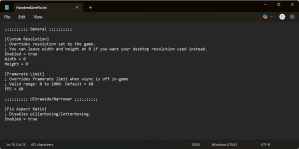
Set the values of the additional features to your liking. You also need to enable the custom resolution feature by setting the value of “Enabled” to true.
All credits go to Lyall for creating and testing the patch. Their contributions are incredibly helpful for PC gamers, and you can learn about their work on their Patreon or Ko-fi pages.
To remove the patch, either set the values of the features to disable in the configuration file or simply delete the files that came in the zip file. I doubt that the developers will be adding official support to the title, and as usual, Lyall’s work is your best bet if you want to play the game on an ultrawide monitor.


